Which Tripo AI Discount Code Should You Use?
The best Tripo AI discount code depends on the plan and billing option you choose. Tripo currently has both fixed-dollar coupons and percentage-based discounts, so the coupon with the biggest headline number is not always the one that gives you the lowest final price.
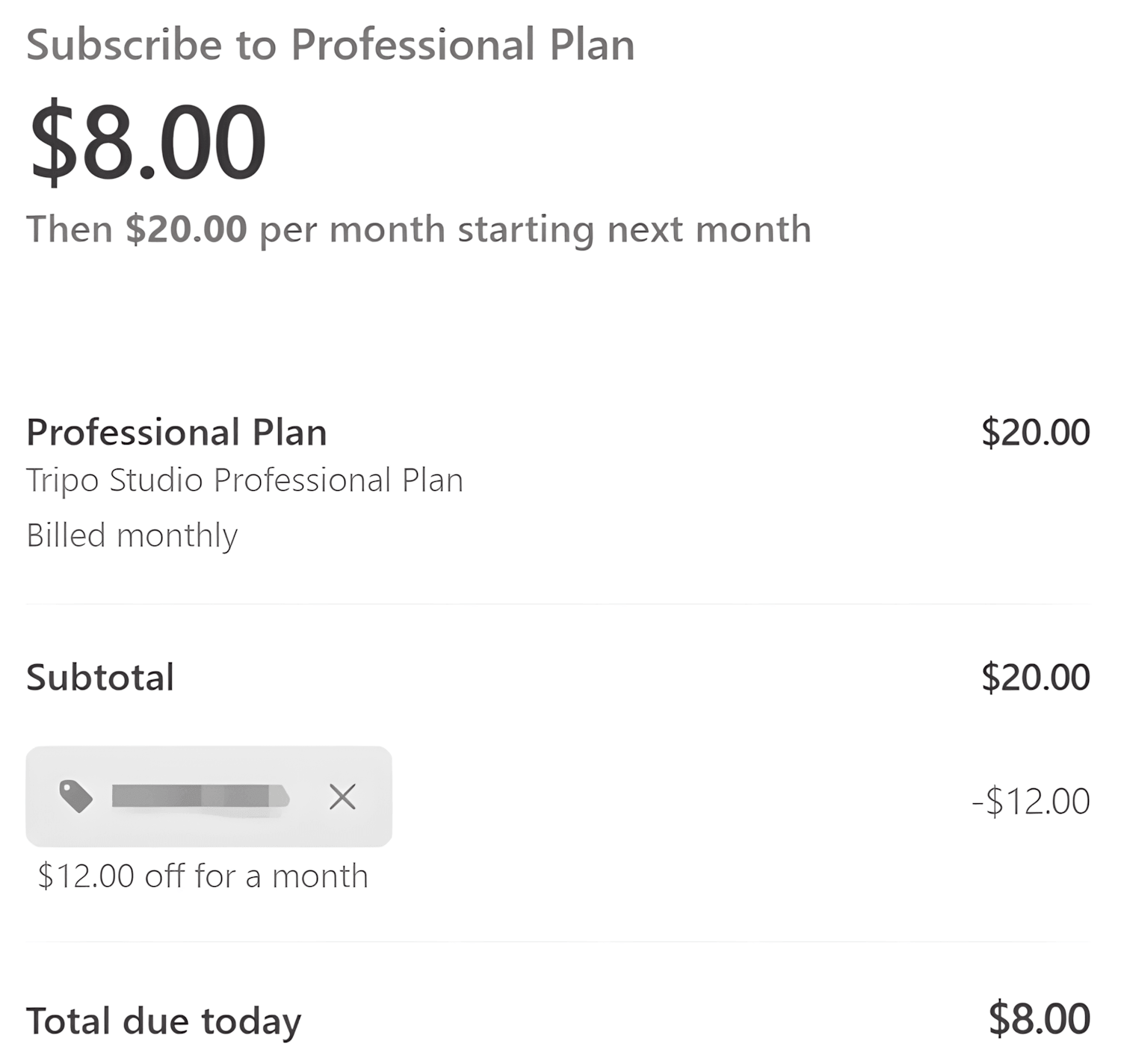
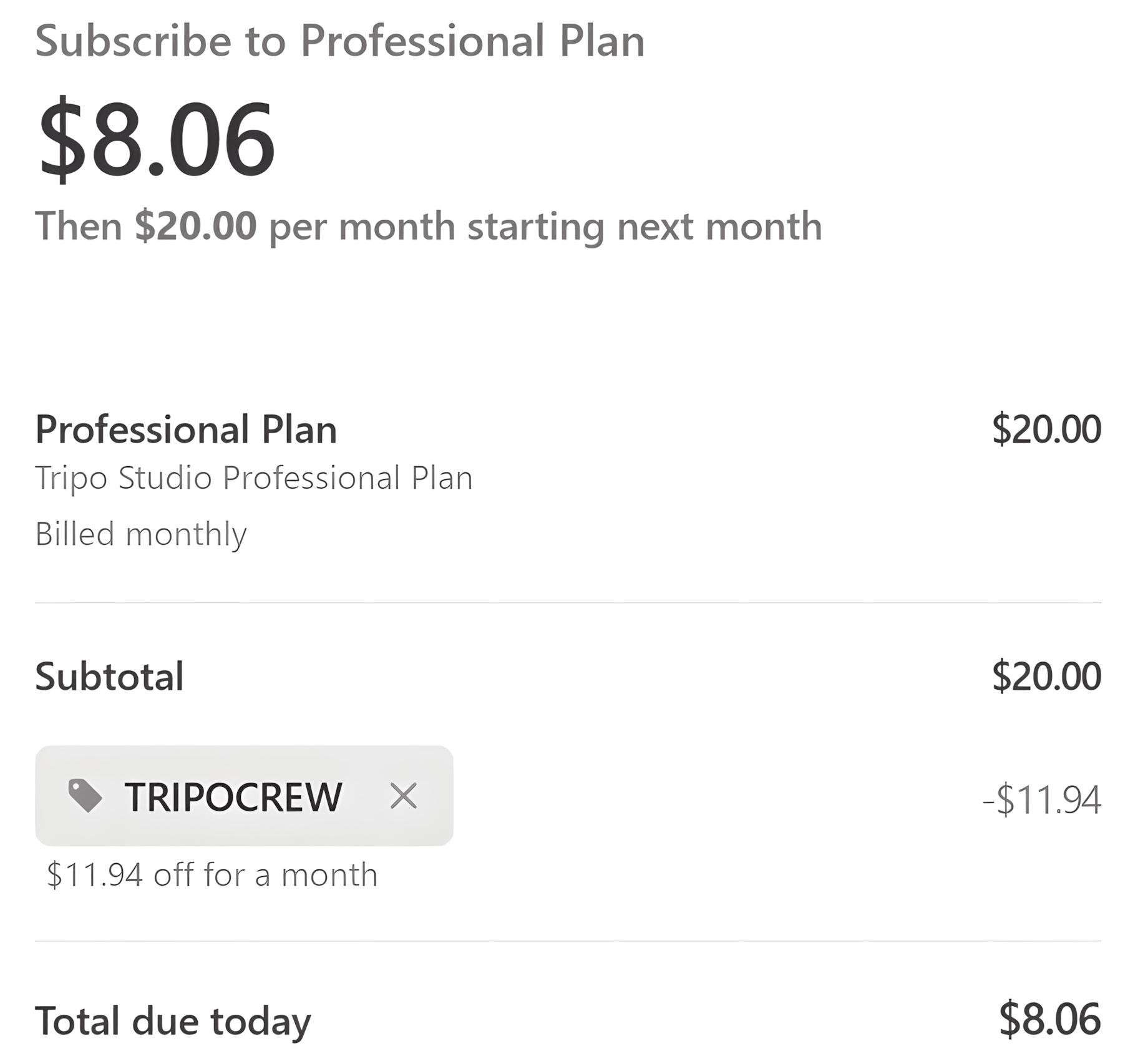
For the Pro 3K monthly plan, the regular price is $20 per month. The $12 off coupon reduces the first payment to $8, which is effectively 60% off. This is better than the 25% off code, which would reduce the same plan to $15, and also slightly better than the $11.94 off offer, which brings the price to $8.06.
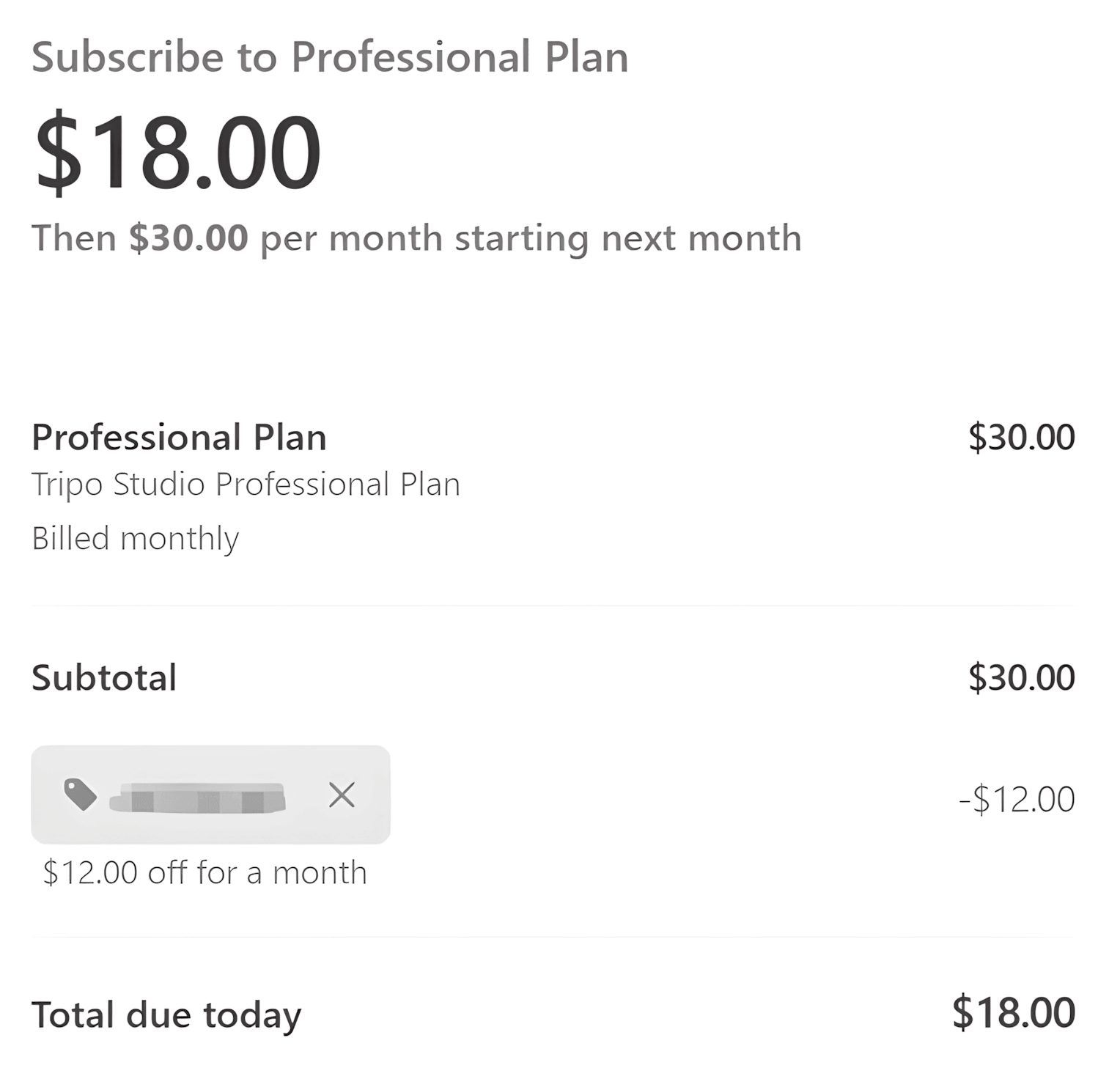
For the Pro 6K monthly plan, the regular price is $30 per month. Using the $12 off coupon lowers the first payment to $18, an effective saving of 40%. By comparison, 25% off would reduce the price to $22.50, while the $10 off code would bring it to $20. Based on the current pricing, the $12 off code is the better choice for Pro 6K monthly.
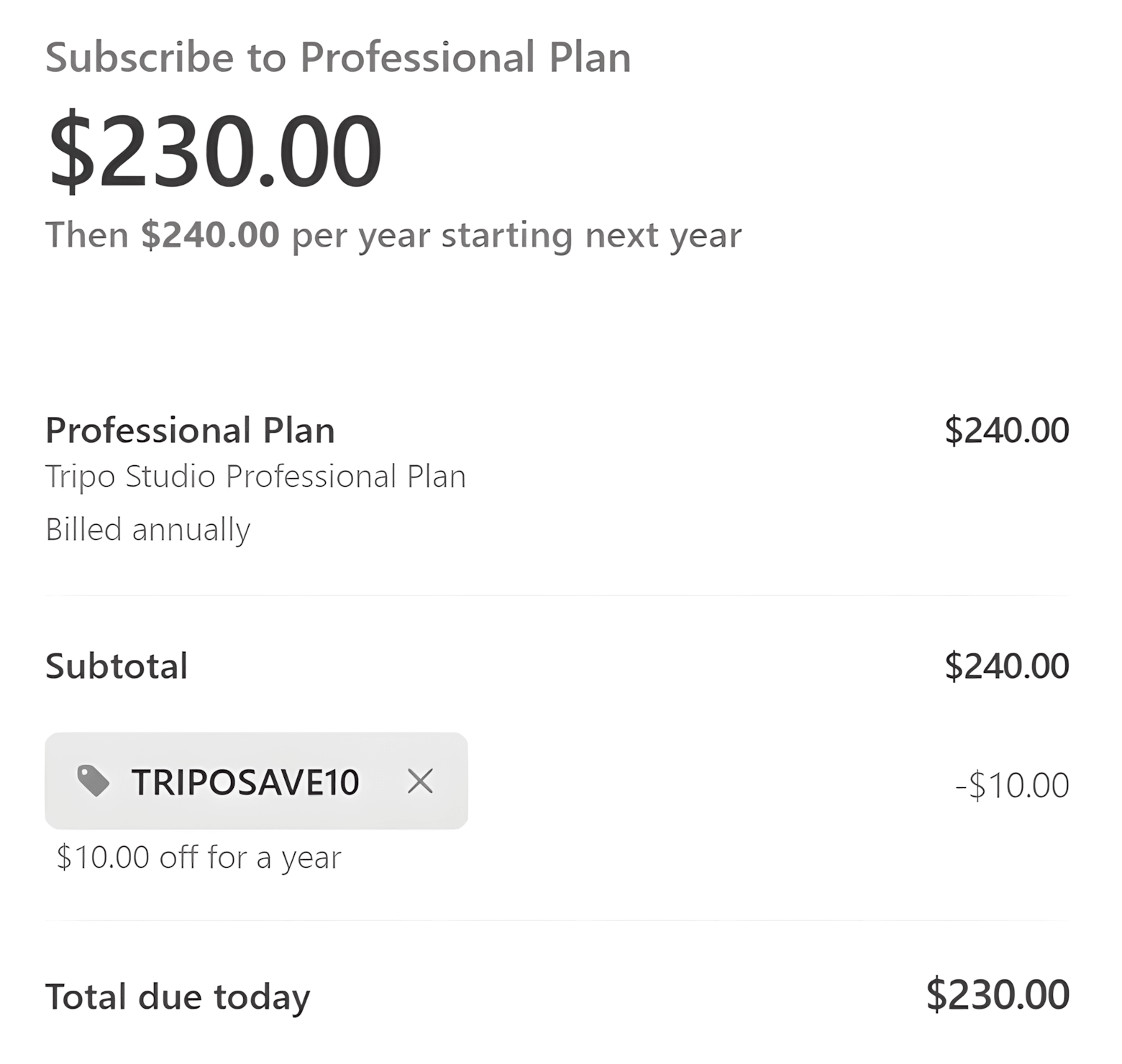
Annual Pro subscriptions are different because the higher plan price makes percentage-based savings much more valuable. For example, the Pro 3K annual plan costs $240 per year. A 25% discount saves $60, reducing the price to $180, while the $12 off coupon would only bring it down to $228. For annual Pro subscriptions, the 25% off code is generally the better option once the plan price is high enough.
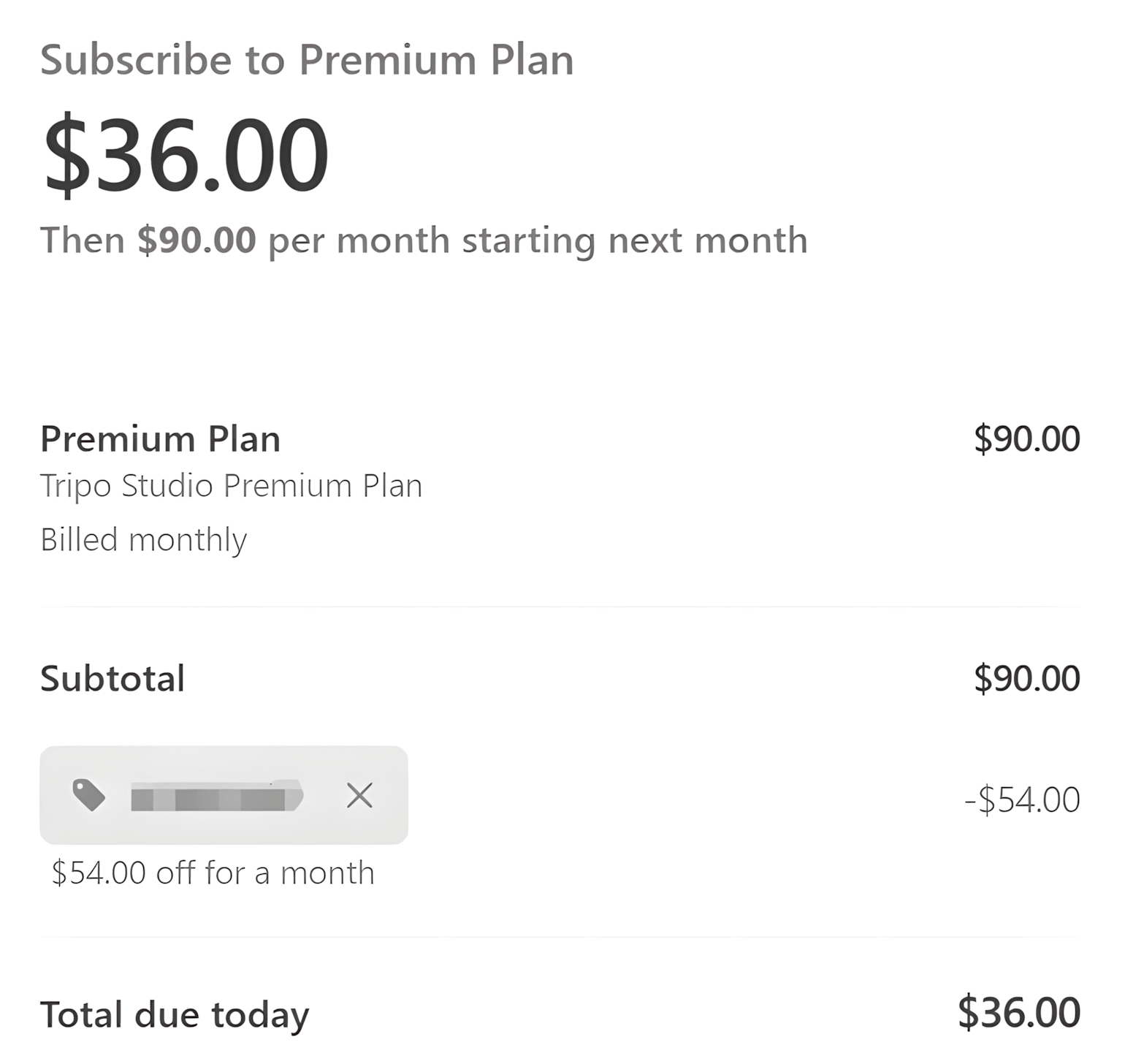
For the Max monthly plan, the regular price is $90 per month. The dedicated $54 off Max coupon reduces the first payment to $36, which is also equivalent to 60% off. The 25% off code would reduce the same plan to $67.50, and the $10 off code would leave the total at $80. For monthly Max, the $54 off coupon provides the largest saving.
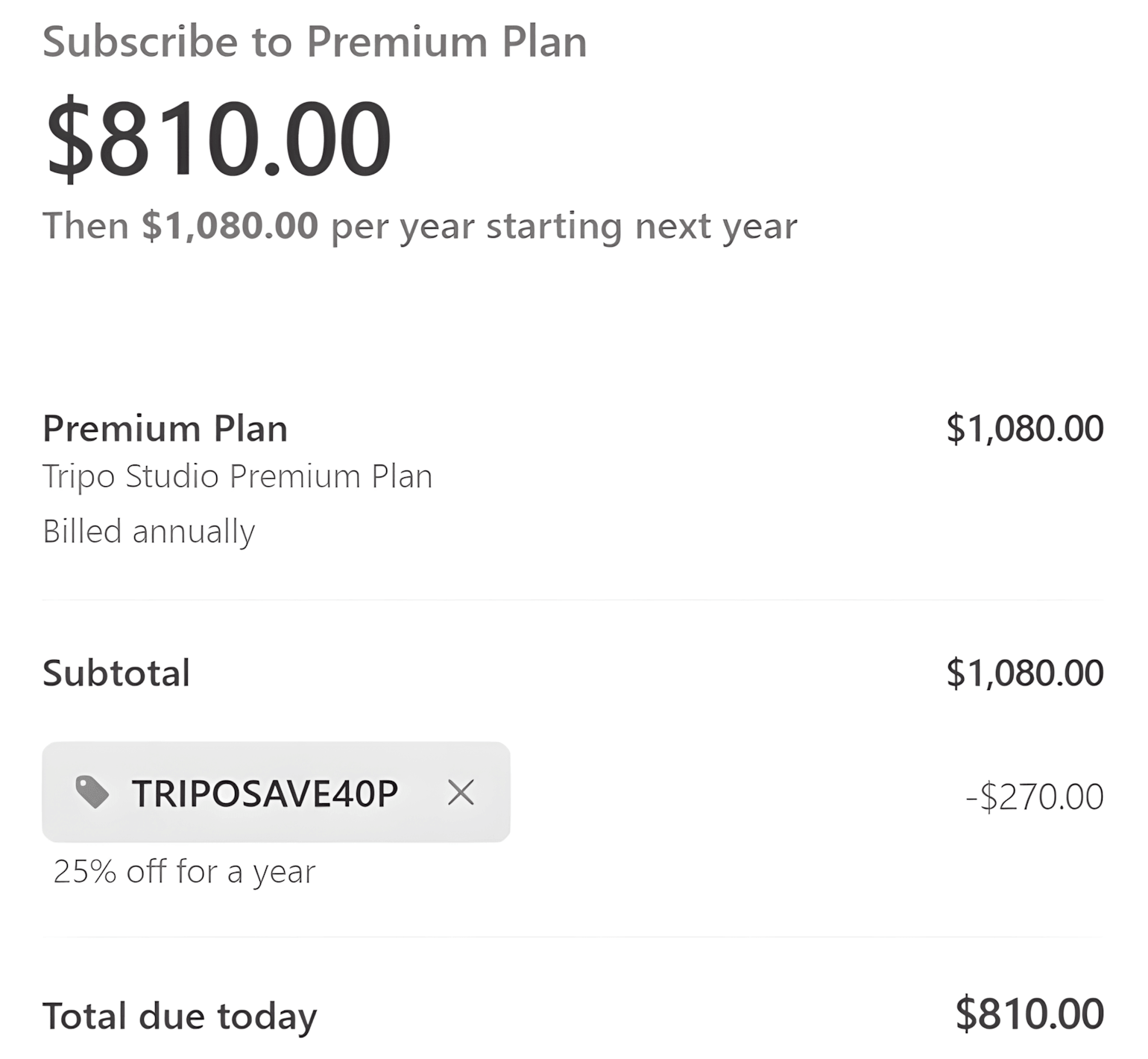
For the Max annual plan, the regular price is $1,080 per year. In this case, the 25% off coupon is much stronger: it saves $270 and lowers the annual price to $810. The fixed $54 Max coupon would only reduce the total to $1,026, so the percentage discount is clearly the better choice for annual billing.
Quick Tripo AI Discount Code Comparison
| Tripo AI Plan | Regular Price | Best Discount Code | Price After Discount |
|---|---|---|---|
| Pro 3K Monthly | $20/month | $12 Off | $8 |
| Pro 6K Monthly | $30/month | $12 Off | $18 |
| Pro 3K Annual | $240/year | 25% Off | $180 |
| Max Monthly | $90/month | $54 Off | $36 |
| Max Annual | $1,080/year | 25% Off | $810 |
A useful rule is that the $12 off Pro coupon beats a 25% discount whenever the subscription price is below $48. Once the price goes above $48, 25% off saves more. The same idea applies when comparing fixed-dollar coupons with percentage-based offers.
If more than one Tripo AI promo code is available for your plan, compare the final checkout price rather than choosing based only on the advertised percentage or dollar amount. This is especially important when deciding between monthly and annual billing.
Tripo AI Pro 3K vs 6K vs 12K: Which One Should You Choose?
Tripo AI Pro comes with three credit options: 3K, 6K, and 12K. The main difference is the number of monthly credits you receive, while the core Pro features, such as private models, commercial use, batch generation, higher queue priority, and unlimited storage, are available across the Pro range.
For most users, the right choice depends on how frequently they generate 3D models and how quickly they use their monthly credits. Choosing a larger plan only makes sense if you are likely to use the extra capacity.
Pro 3K: Best for Light or Occasional Use
The 3K Pro plan includes 3,000 monthly credits and is the most affordable paid Pro option. The regular monthly price is currently $20.
This tier makes the most sense if you are moving beyond the Free Plan but still generate 3D models only occasionally. It gives you access to the main paid Pro features without paying for a larger monthly credit allowance that you may not use.
It is also particularly attractive with the current $12 off Tripo AI Pro discount code. On the monthly 3K plan, the price drops from $20 to $8 for the first billing period, which is effectively 60% off.
If you are not yet sure how many credits you will need each month, starting with Pro 3K is usually the safer choice. You can monitor your usage and move to a higher tier later if 3,000 credits regularly become too limiting.
Pro 6K: Better for Regular Creators
The 6K Pro plan includes 6,000 monthly credits, giving you twice the credit allowance of the 3K tier. The monthly plan we tested was priced at $30 per month.
This option is better suited to creators who use Tripo AI regularly and expect to generate more models each month, but who still do not need the much larger capacity of the Max plan.
The current $12 off Pro code also works with the 6K monthly plan. At the regular $30 price, the coupon reduces the first payment to $18, which is an effective 40% saving.
For many individual creators, 6K is a useful middle ground between the entry-level 3K plan and the higher-volume 12K or Max options.
Pro 12K: Best for High-Volume Individual Use
The 12K Pro plan includes 12,000 monthly credits, making it the largest Pro option before moving to Tripo Max.
This plan is most suitable for individual creators who generate 3D assets frequently and need substantially more credits than the 3K or 6K tiers, but who do not yet need the 25,000 monthly credits and higher-capacity workflow features included with Max.
The fixed $12 Pro discount can also be used with the 12K plan. However, as the subscription price increases, a fixed $12 saving becomes less valuable in percentage terms. This is where the current 25% off Tripo AI Pro / Max discount code becomes important to compare.
A useful rule is that a $12 discount saves more than 25% off when the subscription price is below $48. Once the price is above $48, the 25% discount provides the larger saving. If you are choosing Pro 12K, compare both codes before subscribing rather than automatically using the fixed-dollar coupon.
Tripo AI Pro Plan Comparison
| Pro Plan | Monthly Credits | Best For | Discount Consideration |
|---|---|---|---|
| 3K | 3,000 | New or occasional paid users | $12 off reduces the $20 monthly price to $8 |
| 6K | 6,000 | Regular individual creators | $12 off reduces the $30 monthly price to $18 |
| 12K | 12,000 | High-volume individual creators | Compare the $12 off code with the 25% off code |
| Max | 25,000 | Power users with much heavier workloads | Compare the Max-specific discount with the 25% off code |
Which Tripo AI Pro Tier Is the Best Value?
If you are upgrading from the Free Plan for the first time, Pro 3K is probably the best place to start. It gives you access to the main paid features while keeping the monthly cost and credit commitment relatively low.
Choose Pro 6K when 3,000 credits regularly become restrictive, but your workload still does not justify moving to Max. It doubles the monthly credit allowance while remaining a relatively moderate step up in price.
Choose Pro 12K when you already know that your monthly generation volume is high. At that point, it is also worth comparing the price and features of 12K with Max. If the difference in cost is relatively small for your usage, the additional credits and higher-capacity workflow features included with Max may provide better value.
In general, it is better to start with the amount of credits you realistically expect to use rather than paying for the largest plan in advance. Monitor your monthly credit usage and upgrade when you regularly approach your plan limit.
Tripo AI Monthly vs Yearly: Which Billing Option Is Better?
Choosing between monthly and yearly billing for Tripo AI depends on how long you expect to use the service, how predictable your credit usage is, and which discount code gives you the best final price. The monthly option offers more flexibility, while annual billing can make more sense for users who already know that Tripo AI will be part of their long-term workflow.
Choose Monthly Billing If You Want More Flexibility
Monthly billing is usually the better choice if you are still testing Tripo AI, working on a short-term project, or are not yet sure how many credits you will need. You can start with a lower-cost plan, monitor your usage, and move to a higher credit tier later if necessary.
Monthly plans can also benefit more from some of Tripo AI's current fixed-dollar discount codes. Because the subscription price is lower, a fixed saving can translate into a much larger percentage discount.
For example, the Pro 3K monthly plan costs $20. A $12 discount reduces the first payment to $8, which is effectively 60% off. On the Pro 6K monthly plan, which costs $30, the same $12 discount reduces the price to $18, equivalent to a 40% saving.
The same pattern applies to Tripo Max. The regular Max monthly price is $90, and the current $54 off Max offer reduces the first payment to $36. That is also an effective 60% discount on the monthly subscription.
Choose Yearly Billing If You Expect to Use Tripo AI Long Term
Annual billing is more suitable for users who already know that they will continue using Tripo AI throughout the year. Paying for a full year reduces the need to manage a subscription every month and can make higher-value percentage discounts much more useful.
Percentage-based coupon codes become especially important on annual plans because they scale with the subscription price. For example, the Pro 3K yearly plan costs $240. A 25% discount saves $60, reducing the annual price to $180. A fixed $12 coupon would only reduce the same plan to $228.
The difference is even larger with Tripo Max. The Max annual plan costs $1,080. A 25% discount saves $270, bringing the total down to $810. By comparison, the fixed $54 Max coupon would reduce the annual price to only $1,026.
Monthly vs Yearly Discount Comparison
| Plan | Regular Price | Best Discount Code | Discounted Price | Best For |
|---|---|---|---|---|
| Pro 3K Monthly | $20/month | $12 Off | $8 | Trying Pro at the lowest upfront cost |
| Pro 6K Monthly | $30/month | $12 Off | $18 | Regular individual use with more credits |
| Pro 3K Yearly | $240/year | 25% Off | $180 | Long-term Pro users |
| Max Monthly | $90/month | $54 Off | $36 | Testing Max or short-term high-volume use |
| Max Yearly | $1,080/year | 25% Off | $810 | Long-term power users |
Which Billing Option Should You Choose?
Choose monthly billing if you are new to Tripo AI, your workload changes from month to month, or you want to take advantage of a strong fixed-dollar coupon without committing to a full year. This is especially attractive for the Pro 3K and Max monthly plans, where the current fixed discounts can reduce the first payment by as much as 60%.
Choose yearly billing if you already use Tripo AI regularly and expect to keep your subscription for the long term. On higher-priced annual plans, percentage-based discounts can save substantially more money than fixed-dollar coupons.
One important point is that some Tripo AI promo codes apply only to the current billing period. A heavily discounted first month does not necessarily mean that the same price will continue at renewal. Before completing your purchase, check the amount due today as well as the regular renewal price shown on the checkout page.
If you are still unsure, monthly billing is generally the lower-risk option. It gives you time to understand your real credit usage before committing to a yearly subscription.
Tripo AI Free vs Pro vs Max vs Team: Which Plan Is Right for You?
Tripo AI offers several plans for very different levels of 3D generation usage. The Free plan is designed for trying the platform, Pro is aimed at individual creators, Max is built for high-volume power users, and Team is intended for studios and groups producing 3D content at scale.
Choosing the right plan is not simply about buying the largest credit allowance. Consider how often you generate 3D models, whether you need commercial use or private assets, how many credits you actually consume, and whether you are working alone or with a team.
Tripo AI Free: Best for Trying AI 3D Generation
If you are new to Tripo AI, the Free plan is the best place to start. New users receive free credits, so you can try AI 3D generation without making an upfront payment or immediately committing to a subscription.
The current Free plan includes 200 monthly credits, which Tripo estimates can generate around 13 models. It supports one concurrent task and uses the standard generation queue.
Free is most useful for experimenting with Tripo's workflow, testing the quality of generated models, or deciding whether AI 3D generation fits your needs. However, it has more restrictions than the paid plans, including limitations around private assets and commercial use.
If you only generate a few models occasionally or are still evaluating the platform, there is little reason to pay immediately. Use the free credits first and upgrade once you know which paid features or credit capacity you actually need.
Tripo AI Pro: Best for Most Individual Creators
Tripo Pro is the most practical paid option for individual 3D creators. According to Tripo, it is designed for solo creators who want to use AI 3D generation for personal projects, experimentation, and more serious creative work.
Compared with Free, Pro adds features that become important once Tripo is part of a real production workflow, including commercial use, private models, batch generation, higher queue priority, and greater storage capacity.
Pro is also flexible because you can choose between 3K, 6K, and 12K monthly credit allowances. The entry-level 3K monthly plan currently starts at $20 per month, while the 6K option we tested costs $30 per month.
For someone upgrading from Free for the first time, the 3K Pro plan is usually the most sensible starting point. You can move to 6K or 12K later if your monthly credit usage consistently becomes too high.
Current Tripo AI discount codes can also make Pro considerably cheaper. For example, the $12 off Pro offer reduces the $20 monthly 3K plan to $8 for the first billing period, an effective 60% saving.
Tripo AI Max: Best for Heavy Individual Users
Tripo Max is designed for power users who rely on AI 3D generation as part of their regular creative workflow. The current Max plan includes 25,000 monthly credits, substantially more than even the 12K Pro tier.
Max is not simply a larger credit package. It is intended for users who need more production capacity and includes support for significantly more concurrent tasks, along with higher-priority workflow features designed for frequent generation.
The regular monthly Max price is currently $90. A current Max-specific discount can reduce the first monthly payment by $54, bringing the price down to $36. For annual Max subscriptions, however, percentage-based offers can provide much larger total savings.
Max makes the most sense if you are regularly using up a high-tier Pro allowance, generating many assets every week, or need the additional workflow capacity. If you only use Tripo occasionally, paying for 25,000 credits each month is likely unnecessary.
Tripo AI Team: Best for Studios, Agencies and Collaborative Work
The Team plan is built for professional creators, studios, agencies, and teams producing 3D content at scale. Unlike Pro and Max, which are primarily individual plans, Team is intended for workflows involving multiple users and much larger production requirements.
The current Team plan includes 90,000 monthly credits and supports substantially higher concurrent generation capacity. That makes it more suitable for organizations producing large numbers of 3D assets rather than an individual creator simply looking for more credits.
Current pricing is shown on a per-seat basis. For example, the pricing page we checked showed $110 per month per seat, with a three-seat setup totaling $330 per month. This makes Team a significantly larger commitment than Pro or Max and means it usually only makes financial sense when multiple people genuinely need access.
Individual creators should generally consider Pro or Max first. Team becomes more relevant when collaboration, shared production capacity, and studio-scale output are part of the requirement.
Tripo AI Plan Comparison
| Plan | Monthly Credits | Best For | When to Choose It |
|---|---|---|---|
| Free | 200 | Beginners and occasional testing | Start here if you want to try Tripo AI before paying |
| Pro | 3,000 / 6,000 / 12,000 | Individual creators | Choose Pro when you need commercial use, private models, or more monthly credits |
| Max | 25,000 | High-volume individual users | Choose Max when Tripo is part of your regular production workflow and Pro no longer provides enough capacity |
| Team | 90,000 | Studios, agencies and teams | Choose Team when multiple users need larger-scale production capacity |
When Should You Upgrade from Free to Pro?
You do not necessarily need to upgrade as soon as your free credits run low. First consider why you need a paid plan.
Upgrading to Pro becomes much more worthwhile if you need to use generated assets commercially, keep your models private, generate substantially more content each month, or use Tripo as part of a regular creative workflow rather than for occasional experimentation.
If none of those requirements apply yet, continuing with the Free plan can be more economical.
When Should You Upgrade from Pro to Max?
Moving from Pro to Max should usually be driven by actual usage volume. If you repeatedly approach the limits of a 6K or 12K Pro plan, generate assets throughout the day, or need greater concurrent generation capacity, Max starts to make more sense.
If your main reason for considering Max is simply that it is the higher-tier plan, staying with Pro is likely better value. Pro 12K already provides a substantial monthly credit allowance for an individual creator, while Max is designed for much heavier usage.
Which Tripo AI Plan Offers the Best Value?
There is no single best Tripo AI plan for everyone. For a new user, Free offers the best value because it lets you test the platform without paying. For most individual creators who need paid features, Pro is likely to offer the best balance of cost, credits, and functionality.
Max becomes better value only when you can actually use its much larger credit allowance and production capacity. Team is primarily valuable when multiple people are working together, and the additional scale justifies the substantially higher subscription cost.
A practical approach is to start with Free, move to the lowest Pro tier that meets your needs, and upgrade based on your real monthly credit usage. This avoids paying for capacity you may not use and makes it easier to identify when a higher plan genuinely provides better value.
Tripo AI Student & Educator Discount: Is 70% Off Better Than a Promo Code?
If you are a student or educator, Tripo AI's education offer is usually one of the strongest ways to save on the Pro plan. After verifying your education status, eligible users can get 70% off Tripo Pro, reducing the advertised price from $19.90 per month to $5.99 per month for up to 12 months.
This is different from a normal Tripo AI promo code. The education discount requires verification, while regular coupon codes can usually be applied directly at checkout without proving student or educator status.
How the 70% Education Discount Compares with Regular Promo Codes
For the standard Pro 3K monthly plan, the regular price is around $20 per month. One of the strongest general Pro coupons currently gives $12 off, reducing the first payment from $20 to $8.
By comparison, the verified student or educator price is $5.99 per month. That means the education offer is about $2.01 cheaper per month than the $12 off coupon on the Pro 3K monthly plan.
| Offer | Regular Price | Discounted Price | Saving |
|---|---|---|---|
| Student / Educator Discount | $19.90/month | $5.99/month | 70% Off |
| $12 Off Pro Coupon | $20/month | $8 first billing period | $12 Off / Effective 60% Off |
| 25% Off Pro Coupon | $20/month | $15 | 25% Off |
| $10 Off Pro Coupon | $20/month | $10 | $10 Off |
When Is the Student or Educator Discount the Better Choice?
If you qualify for education pricing and plan to use Tripo Pro for more than a short period, the 70% education discount is generally the better deal. The $5.99 monthly price is lower than the discounted price produced by the regular Pro coupons we compared, and the education pricing can remain available for up to 12 months.
The difference becomes more important over time. At $5.99 per month, 12 months would cost approximately $71.88. At $8 per month, the same 12-month period would cost $96 if the $12 discount were available every month. In practice, however, many regular promo codes apply only to the first billing period, which makes the education offer even more attractive for longer-term use.
When Might a Regular Tripo AI Coupon Be Better?
A regular promo code may still make more sense if you do not qualify for education verification, only need Tripo for a short project, or are buying a different plan that is not covered by the student or educator offer.
For example, Tripo also offers discounts for Max plans and higher-priced subscriptions. In those cases, a Max-specific coupon or percentage-based discount may provide a larger dollar saving than the education offer, which is focused on Tripo Pro.
Do You Need a Coupon Code for the Tripo AI Student Discount?
No public coupon code is required. To access the education price, you need to use Tripo's education verification process and confirm your student or educator status. Once approved, the special pricing is applied to the account.
Because the education discount is a separate pricing program, do not assume it can be combined with a regular Tripo AI promo code or the default bonus discount. Compare the final price shown on your account before subscribing.
Our Recommendation
If you are eligible for the Tripo AI student or educator offer, use the 70% education discount first. At $5.99 per month, it beats the general Pro coupons we compared for the entry-level monthly Pro plan and can remain available for up to 12 months.
If you cannot verify education status, the next-best option depends on the plan you choose. For Pro 3K monthly, the $12 off coupon is currently one of the strongest alternatives, while higher-priced Pro or Max plans may benefit more from percentage-based or plan-specific discounts.
How to Use a Tripo AI Coupon Code
Applying a Tripo AI coupon code can be slightly different from a typical checkout process because Tripo sometimes adds a default bonus discount to your account automatically. If that bonus is already active, you need to remove it before applying another promo code.
Step 1: Log In to Your Tripo AI Account
Sign in to Tripo AI and open Tripo Studio. Once you are logged in, look at the top-right area of the page and click the Upgrade button.
Step 2: Check Whether a Default Bonus Is Already Applied
The Tripo Studio pricing window will open after you click Upgrade. Scroll down toward the bottom of the pricing page.
If your account already has a default bonus, you may see a message explaining that you need to remove the current coupon before using another one. This means the automatic bonus and a separate Tripo AI coupon code cannot be combined.
Step 3: Remove the Default Bonus If You Want to Use Another Coupon
Click Remove Coupon to remove the default bonus from your account.
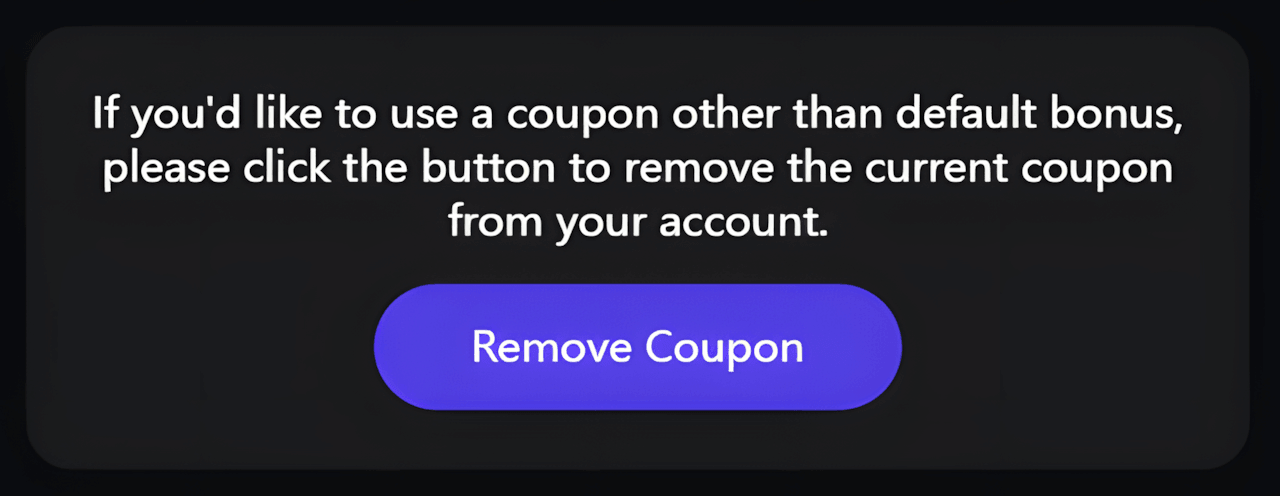
Before doing this, it is a good idea to note the current discounted price. Tripo's automatic bonus can sometimes be quite strong, so you should compare it with the coupon you plan to use and keep whichever option gives you the lower final price.
Step 4: Choose Your Tripo AI Plan
After removing the default bonus, scroll back up and select the plan you want to purchase. Tripo currently offers options such as Pro 3K, Pro 6K, Pro 12K, Max, and Team, with monthly and annual billing available for many plans.
Make sure you select the correct plan and billing period because some Tripo AI discount codes work only with specific plans or may provide a different saving on monthly and yearly subscriptions.
Step 5: Click Subscribe
Once you have selected your plan, click Subscribe. You will then be taken to the checkout page, where the regular subscription price and order total are displayed.
Step 6: Click "Add Promotion Code"
On the checkout page, look for the Add promotion code option. Click it to open the promo code field, then enter your Tripo AI coupon code and apply it.
Step 7: Check the Final Price Before Paying
After the code is applied, confirm that the checkout total has changed as expected. Check the discount amount, total due today, and renewal price before completing your purchase.
This is especially important with Tripo AI because some discounts apply only to the first billing period. A monthly plan may have a much lower first payment but return to the regular price at the next renewal.
Tripo AI Coupon Code Troubleshooting
If a Tripo AI coupon code is not giving you the discount you expected, the problem is often related to the selected plan, billing option, or an existing bonus already attached to your account. Before assuming the code is invalid, check the points below.
1. Remove the Default Bonus Before Applying Another Coupon
Tripo Studio sometimes adds a default bonus discount automatically. This bonus can reduce the price by up to 60%, depending on the plan and billing option.
The default bonus cannot be combined with another Tripo AI coupon code. If a bonus is already active, Tripo may ask you to remove the current coupon before entering a different one.
Look for the Remove Coupon button on the pricing page. After removing the default bonus, apply the new promo code and compare the updated checkout total with the original bonus price. Do not remove the automatic discount unless the new coupon actually gives you a lower final price.
2. Make Sure the Coupon Matches Your Plan
Not every Tripo AI coupon works with every subscription. Some offers are limited to Pro, while others are designed specifically for Max or work across both plans.
For example, a $54 off Max coupon will not necessarily apply to a Pro subscription, while a Pro-specific $12 discount is intended for the Pro 3K, 6K, and 12K options.
Before entering a code, confirm that you have selected the correct plan on the Tripo Studio pricing page.
3. Check Whether You Selected 3K, 6K, or 12K Pro
Tripo Pro has multiple credit tiers, including 3K, 6K, and 12K. A coupon may work across all three tiers, but the actual percentage saving can look very different because the regular prices are different.
For example, a fixed $12 discount reduces the $20 Pro 3K monthly plan to $8, which is effectively 60% off. The same $12 saving on the $30 Pro 6K plan reduces the price to $18, which is effectively 40% off.
If the code is accepted but the percentage saving looks smaller than expected, check whether you are comparing it with a different Pro tier.
4. Check Monthly vs Yearly Billing
The same coupon can produce very different savings depending on whether you choose monthly or annual billing.
Fixed-dollar coupons are often more attractive on lower-priced monthly subscriptions, while percentage-based discounts usually become more valuable on annual plans. For example, 25% off a $1,080 Max annual subscription saves $270, which is much more than a fixed $54 discount.
If a coupon seems weaker than expected, confirm that you selected the same billing option for which the offer was advertised or tested.
5. A Fixed-Dollar Coupon Is Not a Percentage Discount
Some Tripo AI offers provide a fixed amount off rather than a fixed percentage. This can confuse when the same code is used on different plans.
A $12 off coupon may equal 60% off on a $20 plan, but it does not mean every Pro subscription receives 60% off. Likewise, a $54 Max coupon equals 60% off when applied to the $90 monthly Max plan, but the same $54 saving represents a much smaller percentage of an annual subscription.
Always look at the actual amount deducted at checkout rather than assuming the percentage will remain the same across every plan.
6. Check Whether the Discount Applies Only to the First Billing Period
Several Tripo AI offers we tested reduced the amount due today but showed the regular subscription price for the next renewal.
For example, a discounted monthly plan may show a lower first payment and then state that the subscription will renew at the normal monthly rate starting next month. This does not necessarily mean the coupon failed; it may simply be a first-billing-period promotion.
Before subscribing, check both the amount due today and the renewal price shown on the checkout page.
7. Compare the Coupon with the Existing Bonus Price
A coupon can work correctly and still be a worse deal than the automatic Tripo bonus.
For example, if Tripo already gives you 50% off Max automatically, replacing that bonus with a smaller fixed-dollar coupon may increase the final price rather than reduce it.
Whenever a default bonus is active, note the current price first. Then remove the bonus, apply the other coupon, and compare the two totals before completing payment.
8. Student and Educator Discounts Use a Different Process
The Tripo AI student and educator offer is not a normal public coupon code. It requires education verification before the special price is unlocked.
If you are trying to enter a regular promo code expecting the 70% education price, it will not work that way. Use Tripo's education verification process instead.
9. Re-enter the Code Carefully
If the plan and billing option are correct but the code is still rejected, remove any spaces before or after the code and enter it again exactly as provided.
Also make sure an old or automatic coupon is not still attached to your account. Tripo may allow only one active discount at a time.
10. The Offer May Have Changed or Expired
Tripo AI pricing and bonus offers can change over time. A code that worked previously may be updated, restricted, or removed.
If the checkout page no longer accepts a code that was previously valid, try another current Tripo AI discount listed on this page and compare the final price. We periodically recheck available offers because the best coupon can change as Tripo updates its pricing and promotions.
How We Verify Tripo AI Promo Codes
We do more than collect Tripo AI promo codes from public sources. Before listing an offer as verified, we check how it behaves on the actual Tripo Studio pricing and checkout pages.
Our verification process focuses on the details that matter most to users: which plan the code works with, whether it applies to monthly or yearly billing, how much it actually saves, and what price the subscription will renew at after the discounted billing period.
1. We Test Codes on the Tripo Studio Pricing Page
We start by selecting the relevant Tripo Studio plan and billing option, then apply the discount directly through the checkout flow.
For Pro offers, we may test different credit tiers such as 3K, 6K, and 12K. For Max offers, we check whether the coupon works with monthly, annual, or both billing options.
This helps us avoid assuming that a code works across every plan just because it was accepted on one subscription.
2. We Record the Regular Price and the Actual Discount
When a code is accepted, we compare the regular subscription price with the discounted checkout total.
For example, we have verified offers where a Pro plan was reduced from $20 to $8, a Pro 6K plan dropped from $30 to $18, and a Max monthly plan was reduced from $90 to $36.
Recording the actual dollar savings is important because some Tripo AI coupons provide a fixed-dollar discount rather than a fixed percentage. The same code can therefore represent a very different percentage saving depending on the plan you select.
3. We Check Monthly and Yearly Billing Separately
A coupon that is attractive on a monthly subscription is not always the best option for annual billing. We compare both billing periods when the offer supports them.
For example, a fixed-dollar discount may provide a very strong first-month saving, while a percentage-based coupon can save much more on a higher-priced annual subscription.
When possible, we verify both billing options instead of assuming that the same discount value applies in the same way to each one.
4. We Check the Renewal Price
The discounted amount due today is only part of the cost. We also review the renewal information shown at checkout.
Some Tripo AI promotions apply only to the first billing period. In those cases, the checkout page may show a discounted first payment followed by the regular monthly or annual rate at the next renewal.
We include this information in our coupon descriptions when it is visible so users can understand both the immediate saving and the price they may pay later.
5. We Compare Coupon Codes with Tripo's Default Bonus Discount
Tripo Studio sometimes applies a default bonus discount automatically, with savings of up to 60% depending on the plan.
We confirmed that this default bonus cannot be stacked with another coupon code. If a user wants to apply a different promo code, Tripo requires the existing bonus coupon to be removed first.
Because of this, we do not assume that entering an extra coupon will always save more. We compare the automatic bonus price with the price produced by the separate coupon and identify which option gives the lower final checkout total.
6. We Verify Plan Restrictions
Some Tripo AI discounts are limited to a specific subscription type. A Pro coupon may not work with Max, and a Max-specific offer may not apply to Pro.
We also check whether a Pro coupon works across the 3K, 6K, and 12K options rather than treating all Pro plans as identical.
These tests help us describe the offer more accurately and avoid labeling a plan-specific code as sitewide.
7. We Keep Verification Screenshots
For selected offers, we keep screenshots from our checkout tests showing the original price, the applied discount, and the final amount due.
These screenshots provide a record of how the offer worked when we tested it. In some cases, the actual coupon code is hidden in the image, but the discount amount and checkout result remain visible.
8. We Date Our Tests and Recheck Offers
Tripo AI can change prices, plan structures, automatic bonuses, and coupon rules over time. For that reason, we record the date of our tests and recheck generous offers periodically.
If a code stops working, changes its plan restrictions, or becomes less valuable than a newer promotion, we update the listing accordingly.
What "Verified" Means on DealsValid.com
When we mark a Tripo AI discount as verified, it means we have checked the offer against the Tripo Studio pricing or checkout flow and confirmed the discount under the plan and billing conditions described on the page.
It does not mean that every code will work with every Tripo plan, account, or future promotion. Always check the final amount due and renewal price before completing your purchase, especially when a default bonus or another discount is already attached to your account.